



Ricoh Projector
Netflix-Licensed 1200 ANSI Auto Focus Outdoor Projector with Wifi6 and Bluetooth, Smart TV OS & DoIby, Portable Projecto
Description
A Must-Read Feature Guide
Ultimate Experience - 2025 Smart Projection for Everyone
ONO3 Projector with Wi-Fi and Bluetooth
The ONO3 projector with Wi-Fi and Bluetooth is the first smart projector to utilize the self-developed smart TV operating system. Supported by advanced AI algorithms and its powerful processing capabilities, it eliminates the clumsiness and latency of traditional operations, achieving a smooth and seamless experience. With multiple personalized settings, including a customizable home page, built-in E-manual, and one-click wake-up screen projection, ONO3 redefines home entertainment with excellent performance.
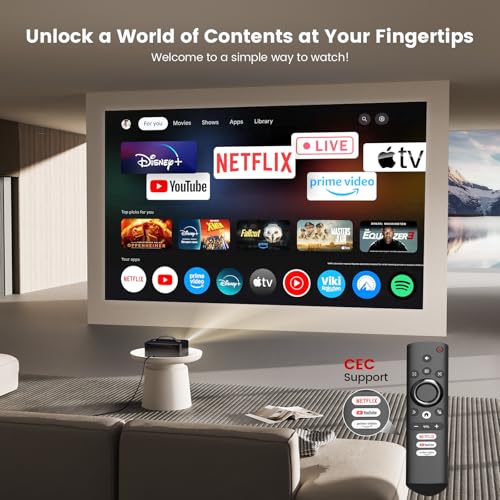
Endless Entertainment - Netflix Licensed, No Need for Extra Devices
The ONO3 outdoor projector deeply integrates with the global streaming media ecosystem, officially licensed by Netflix. It breaks through HDCP limitations and eliminates the risk of black screens caused by pirated content. One-click access to Netflix, Prime Video, YouTube, Apple TV, Disney+, Live TV, and over 1,200,000+ videos meet your personalized entertainment needs. This projector supports 4K and regularly updates to ensure you have the latest features, enhancing application security and stability.
Detail-First Visual Feast - 1200 ANSI | Support 4K
The ONO3 4K projector delivers true 1200 ANSI brightness and 4K video decoding, unlocking the pinnacle of visual performance. Its intelligent AI image optimization system automatically matches color gamut schemes and simulates up to 98% of the NTSC cinematic-wide color gamut. Each frame is meticulously reconstructed with millions of color particles, presenting realistic details with precision. Whether it’s a strand of hair floating in the dust or the trajectory of a leaping flame, everything is vividly brought to life, leaving viewers in awe.
Auditory Revolution - Dolby Certified | AI Sound Balancing
This home projector comes with Dolby-certified HIFI stereo dual speakers that create an immersive 3D sound experience, drawing you into the heart of the movie. Combined with cutting-edge AI sound balancing technology, it delivers delicate sound quality with smooth transitions. This Bluetooth projector also works as a standalone Bluetooth audio or connects to external speakers for a full range of immersive sound experiences.
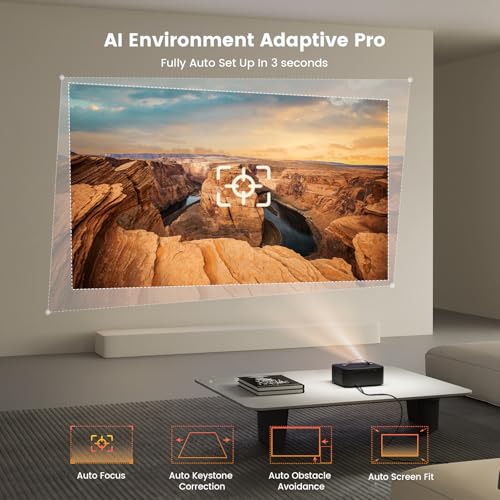
Instant Clarity - Environment Adaptive Pro
The ONO3 ceiling projector is equipped with fully automatic focus, keystone correction, obstacle avoidance, and screen-fit technology. The advanced AI sensor system ensures razor-sharp images and distortion-free alignment in seconds, even on angled surfaces. Whether it is side projection, ceiling, or complex environments, the projector can adjust to the best state autonomously, allowing you to immerse yourself in the best viewing experience. The zoom function allows for size adjustments from 50% to 100% without moving the projector.
Take It Anywhere - Your First Choice Portable Projector
With its breakthrough internal design, the ONO3 mini projector is just 2.4lb and 80% smaller than others with similar brightness. The handheld design and portability ensure that the thrill of a large-screen experience is always within reach anywhere. With the latest Wi-Fi 6 tech, this Wi-Fi projector offers ultra-fast speeds and superior stability. Built-in Chromecast makes it easy to Cast your favorite content. Whether indoors or outdoors, it turns every visual experience into an unforgettable moment. It supports multiple installation methods: desktop/tripod/wall/ceiling mounting (an M4 screw port at the bottom).
Reliability Service - Durability Meets Superior Support
ONO3 mini projector features a sealed optical engine and dual-fan cooling, superior in dust resistance and heat dissipation, extending its lifespan and preventing issues like black or yellow screens. With auto temperature control, the system ensures stable operation through precise temperature monitoring and adjustment. As a company that focuses on long-term development, no matter how long you have purchased it, our service is always consistent, and we are always ready to provide inquiries or assistance.
Note: If you encounter an error when entering the Netflix app, please confirm that the device is connected to the network. After the projector is turned on, the system will automatically detect updates in the background. After 10 minutes, if the latest software version is detected, an upgrade reminder window will pop up. You can click "Confirm" to complete the automatic upgrade. Or you can also manually enter the OTA interface to perform the update operation.


